
AI Coach
Learn strategy and rules with a top-tier AI as your reference
1.What is AI Coach?
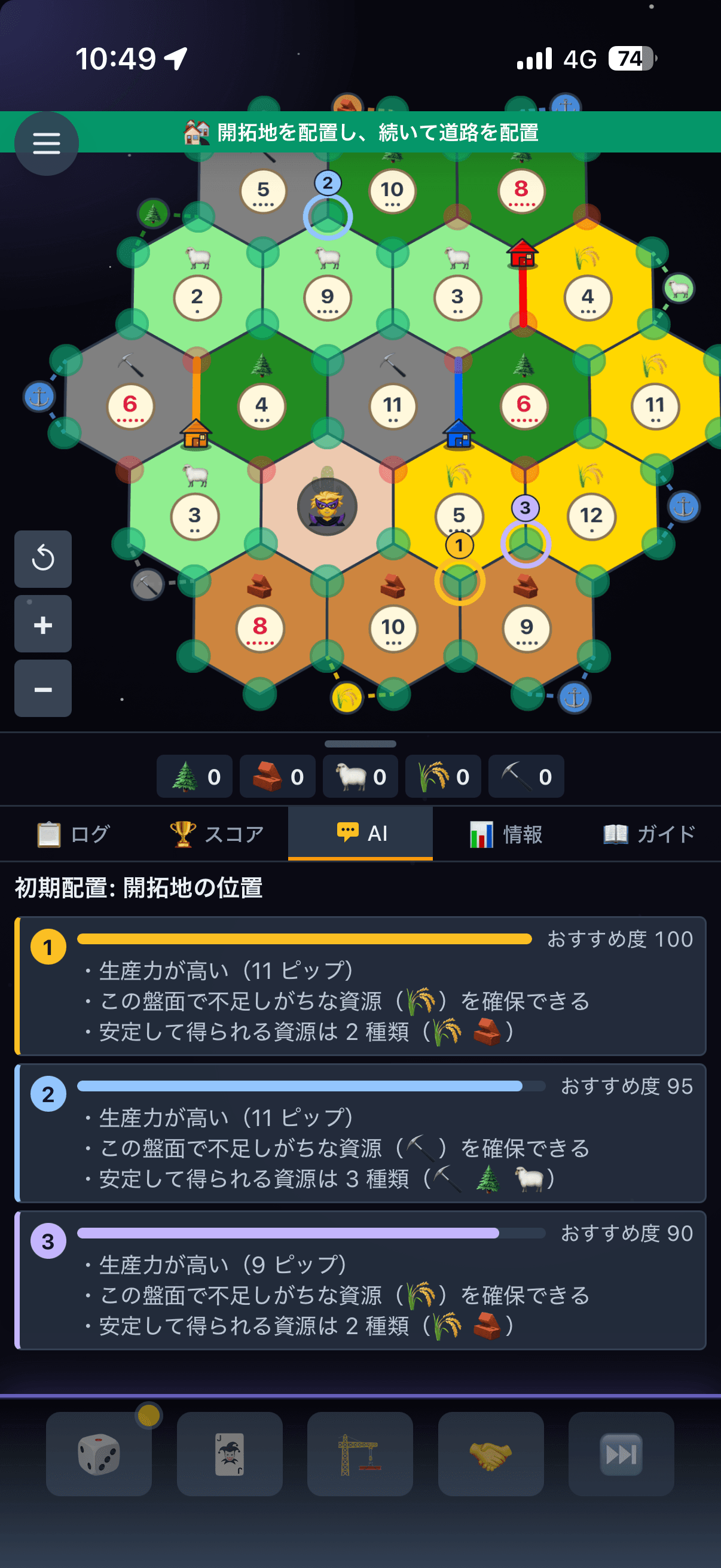
In Practice games, every time it is your turn, the master-tier AI from solo play shows the moves it would consider in that position. Up to 3 candidates are listed, each with a rank, a recommendation score and a short reason, and they are highlighted on the board. The AI has become quite strong but it is not perfect: use it as a reference for strategy and rules, not as an answer key.
The same brain as a master-tier AI
It uses the same decision logic as the master-tier AI in solo play. No randomness is involved, so the same position always gives the same candidates.
With reasons
Each candidate explains why: production, resource mix, ports, how likely a spot is to be taken. Reading the reasons transfers to other positions better than the rank alone.
You make the move
There is no apply button. You check the candidate on the board and place or build it yourself, so the habit sticks.
What it looks like
Initial placement: settlement
- 1Recommended 100%
・High production (10 pips). Secures resources that are scarce on this board (brick)
- 2Recommended 90%
・3 resource types. Adjacent to a 3:1 port
2.When it helps
The candidates switch automatically for each decision you have to make.
Initial settlement
Evaluates production, resource mix, expansion targets and ports together. The second placement favours resources your first one lacks.
Initial road direction
Compares directions by the value of the spot ahead and how likely other players are to take it.
Next action
Compares building, trading, development cards and ending the turn as whole-turn sequences. Builds you can already afford are shown before trades.
Where to build
When you choose Build → settlement / road / city, it shows the best spots available for that type.
Robber and steal target
On a 7 and when you play a knight, it suggests the hex to block and whom to steal from.
What to discard
When a 7 forces you to discard, it picks the combination that hurts your next build the least.
Coins in 1v1
In 1v1 Practice games, it also suggests when to use coins (to force a trade, make an exchange or send the robber to the desert) and which cards to give in a forced trade.
3.How to use it
No setup is needed. Start a Practice game and the coach appears on its own.
Start a game against AI from Practice on the home screen
Candidates appear automatically on your turn (right panel on PC, the AI tab at the bottom on mobile)
Check a candidate on the board highlight and make the move yourself
Turn it off in the settings menu when you do not need it (remembered for next time)
4.Review finished games
After any game ends, in any mode, you can replay it move by move and ask the AI Coach about any position. Use it to find where the game was won or lost.
Tap the button at the right end of a game in your match history on the home screen, or "Review this game" on the results page
Move to the position you want with ◀ ▶ or the turn slider (tap a game log entry to jump to that move)
Tap "Ask the AI Coach about this position" to see suggestions for whoever decides next, and compare them with what was actually played
You can only review games you took part in. Since the game is over and hands are revealed, you can also ask about your opponents' decisions. Games with part of their record missing may not be reviewable.
5.Tips for improving
You can simply follow the candidates, but these habits make you improve faster.
Decide your move first, then look
Positions where your idea and the AI's rank differ are where you can grow. Read the reasons and judge which argument is stronger.
Read the reasons, not just the rank
Reasons like "scarce on this board" or "unlikely to be taken" are yardsticks you can reuse on any board.
Look at #2 and #3 too
When the recommendation scores are close, any of them is fine. Pick the one that fits your plan.
Learn how trades fit together
Sequences like "convert surplus at a port and buy one more thing" are hard to spot at first. Use the suggested sequence as a model.
6.Fairness and limits
It never looks at hidden cards
The coach only uses the board and public information (hand sizes, scores, played cards). It does not read opponents' hidden resources or development cards.
In games: Practice only
During a game it is only available in Practice (not in solo play, ranked, free match or room games). After any game ends, you can ask the coach about each position with "Review this game" on the results page.
Not perfect
It shares the AI's judgement, so it also shares the AI's blind spots. Player-to-player trade proposals are out of scope. Treat it as a reference and make the final call yourself.
7.FAQ
Is AI Coach free?
Yes. Anyone can use it in Practice. No extra sign-up or payment.
Do I have to follow the candidates?
No. They are a reference. Making your own move and comparing it with the AI's judgement is what helps you improve.
Can I use it in games against people?
Not during the game (it is only available in Practice). Once any game has ended, you can ask the coach about each position with "Review this game" on the results page.
Are the candidates always the same?
Yes for the same position. No randomness is used, so you can check the same answer as many times as you like.
Try the AI Coach
In Practice games, the AI Coach suggests your next move, ranked and with reasons.
Try AI Coach in Practice